Logo
A small visible result, held up by the work nobody sees.
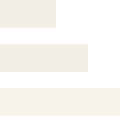
The mark is three left-aligned bars that widen downward — “layered steps”. The smallest bar on top is amber: the visible result people call luck. The two wider bars beneath are cream: the work nobody sees that holds it up. The bottom bar sits at 75% so the foundation fades toward the background without disappearing.
Download all logo files (.zip) ↓01 — Lockups
Mark
Icon-only use: avatars, favicons, watermarks, corners of graphics.

Horizontal
Primary lockup. Headers, banners, documents, anywhere with width.



Stacked
Square-ish spaces: end cards, covers, print, the site sidebar.



Inline (small)
Tiny uppercase lockup for watermarks, footers, lower-thirds.



































































02 — Rules
- 01Clear space = the height of the top bar on all sides. Nothing inside it.
- 02Minimum size: mark 16px tall on screen; horizontal lockup 120px wide; print 8mm.
- 03Don't recolour, outline, rotate, add a gradient, a shadow, or a container shape. Don't rearrange the bars.
- 04Don't set the name in another typeface or in all-caps (except the inline lockup).
- 05Amber bar on cream is fine (it's a shape); amber TEXT on cream is not — use #b06d10.
- 06Never pair with clovers, dice, coins, horseshoes, rockets, robots, or glowing brains. The brand is about work, not luck.
- 07Event lockup is typographic: “The Work Behind the Luck: Build Night”. Programs never get their own logo.
Colour modes
Colour on darkDefault. On navy or any dark photo.
Colour on lightOn cream, paper, or white (amber top + navy bars/text).
White (one colour)Over photos/video, screen-print, anywhere one light colour is needed.
Black (one colour)Fax-safe: print, stamps, documents on white.
Clear space & minimum size
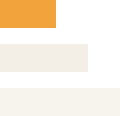
Clear space on every side equals the height of the top bar. On screen the mark is never smaller than 16px tall; the horizontal lockup never narrower than 120px.
03 — Watermark & favicon

Watermark — white, 480pxDownload ↓
480 × 40 · PNGTransparent PNG for video and photos. Bottom-left or top-left, never over faces.
Watermark — white, 55% opacity, 480pxDownload ↓
480 × 40 · PNGTransparent PNG for video and photos. Bottom-left or top-left, never over faces.Place the watermark bottom-right (or bottom-left when a lower-third is present), at about 22% of the frame width, inside the platform's safe area. The 55% version is pre-dimmed for video; the full-opacity one is for editors who set opacity themselves.